Centos更换YUM源及安装Docker
一.Centos更换阿里云YUM
1.备份原始的yum源
进入repo目录
cd /etc/yum.repos.d备份Base.repo
cp CentOS-Base.repo CentOS-Base.repo.bak
2.下载对应版本的repo文件
下载阿里云的: 注意下载后的文件名字设置成了默认的,CentOS-Base.repo
wget -O /etc/yum.repos.d/CentOS-Base.repo https://mirrors.aliyun.com/repo/Centos-7.repo
下载第三方epel源
wget -O /etc/yum.repos.d/epel.repo https://mirrors.aliyun.com/repo/epel-7.repo
3.清除缓存建立新缓存
yum clean all && yum makecache
4.更新
yum update
二.Centos安装Docker
1.安装需要的软件包, yum-util 提供yum-config-manager功能,另两个是devicemapper驱动依赖
yum install -y yum-utils device-mapper-persistent-data lvm2
2.安装Docker的YUM源(阿里仓库)
yum-config-manager --add-repo
http://mirrors.aliyun.com/docker-ce/linux/centos/docker-ce.repo
3.安装Docker
yum -y install docker-ce
[collapse status="true" title="可选:加速配置"]vim /etc/docker/daemon.json
{
"registry-mirrors": [
"https://registry.hub.docker.com",
"http://hub-mirror.c.163.com",
"https://docker.mirrors.ustc.edu.cn",
"https://registry.docker-cn.com"
]
}[/collapse]
4.设置启动和开机自启动
systemctl start docker && systemctl enable docker
5.测试验证
dockers info
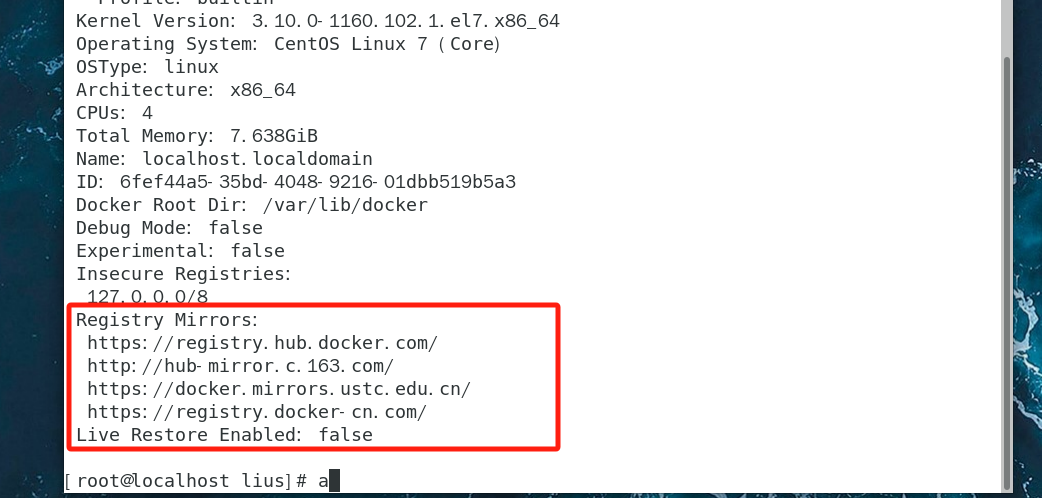
纠正一下,使用docker info查看加速器